Friday, June 10, 2011

Mobile site v/s Mobile app?


With the increase in mobile apps and mobile devices, a very relevant questions for most companies to answer is - should they have a mobile app or stay with just a mobile version of their website.

While the ideal will be to have both, the cost involved in creating an mobile app is a hindrance. Here are some factors you might want to consider to help you decide this:

1) How big is your user base?
If you have a large existing user base (Eg. Amazon), it is a no brainer to have a mobile app rather than just a mobile website

2) What is your Budget?
Creating a quality mobile app can be expensive. Mobile website are far less costly than a mobile app. A factor to consider during the decision making based on the money available.

3) Does it help to add a viral element into your offering?
If you want to integrate Facebook Connect or Twitter to make your product/ message viral, it might be a good idea to use the app route. This gives a much better user interface

4) How important is user experience?
The WOW factor which can be achieved in an app cannot be compared with what can be done in a mobile site.


5) What devices do you want to support?
If you think support on all devices is very very important then the mobile web route might be the best unless you want to invest in building an app for the main app stores, if not all. While a company like Amazon can afford to create mobile app for multiple platforms, can your company do the same?

6) Can you market your app?
While creating an app is cool, a lot is dependent on how will your customers/ users find out about the app. While SEO along with other marketing techiniques makes it simpler to make your sit ediscoverable, marketing an app is a completely different game.

7) Are you launching a new product?
For many new products, it might be a good idea to launch a beta version as an app and get detail feedback from user before you decide to go the web route or use multiple platforms.

8) What is the desired performance?
App performance can be heavily optimized using caching and other features. Also while most apps can continue working off line, mobile sites cannot achieve this.


Wednesday, June 8, 2011

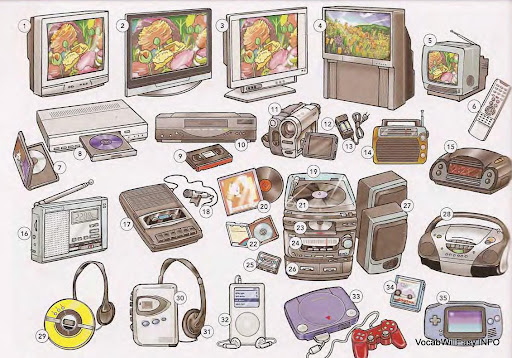
How many devices has the iPhone replaced?


V/S


While I have a bias towards iPhone, I also want to refer this post to most of the smart phones available in the market today. I have tried using some of the latest smart phones, the iPhone has always attracted me back, hence forcing me to abandon the others. But with all due respect, this post refers to not just the iPhone but other smart phones also.


Radio - With apps like Pandora, a standalone Radio device is a thing of the past.


Portable DVD player / MP3 players - The size of local storage provided enable the iPod to replace these forever


Digital Cameras (low end) - The 3.0 megapixel and tap to select focus makes the iPhone a great replacement. The ability to instantly share on Facebook or email to friends makes it even better than a low end digital camera. The iOS 5 is going to make the experience even better.


Low-end camcoders - Build-in video recoder make the iPhone far more practical and easy to use. Sharing on youtube is very simple now.

Stand alone voice recorder - I don't think I need to say anything on this


Landline Phone - VoIP apps further make this a more interesting, low cost and easy replacement


GPS Devices - While the iPhone GPS is still not as good as a standalone Garmin, knowing that the Android has mastered it and there are apps which do it well, I won't be surprised if Apple lauches a fully functional native GPS/ Navigation app. But for now Maps along with other apps on the app store will suffice to replace many, if not all, of the GPS devices.


Compass - Hmm...don't think any of us will ever carry a compass ever again.


Gaming devices - Hail App store! there is a plethora, to say the least, of games of all kinds for users of all ages, interests and skill levels


Calculators - I don't think I will every carry a calculator again


I have kept this limited to the devices and not got into simpler replacements like old pen and paper (replaced by Notes, To-Dos), calendars, alarm clocks - to name a few. Arguably many of these were replaced by the earlier phones.
I am very sure this list is not exhaustive but a good point to start thinking what will be next!

The iPad along with Netflix as already started displacing the TV and DVD player - but for these the size does matter!

Wednesday, June 1, 2011

5 Reasons to Wireframe an App before Design or Development


App wireframes are blueprints that define the apps layout and functionality. The importance of having them right cannot be overemphasized. The reasons I say this:

1) Easily laying out the content and functionality
Wireframes enable you and the stakeholders or client to focus on the core functionality and content of the app rather than spending hours refining the asthetics.

2) Depicting Navigation
The wireframes let you clearly depict flowcharts to show the sequence of flow between screens. You can use the link feature in Balsamiq or use Omnigraffle or Lucid charts. All of them will help you achieve your desired purpose of showcasing the flow of the app even before its developed.

3) Iterating
Its easy to iterate on wireframes if you use a tool like Balsamiq to create digital wireframes. Team members always have feedback which can be easily done to these wireframes. If you did not create wireframes but made direct designs, making changes to this later would be a very very cumbersome process.

4) Coherent Development
Wireframes allow you to consider the software architecture of the app even before you get into the creatives. API optimization, memory management, caching can all be thought out after this phase to ensure optimal app performance. Getting sign off on these from the relevant stakeholders, before development, can really help simplify the development process and reduce the number of iterations.

5) Getting Buy-in of Stake holders
Sometimes it just good to wireframe different concepts out so that you can help present a case to your stakeholders. A picture is worth a thousand words. This might seem cliche but is definitely worth following when presenting a new ground breaking idea, a new product concept or simply an improved version of an existing concept.

Though wireframing is super critical at the start of creating an app, it is important to keep some room for small changes so that the creativity of the graphic designer is not restricted. Especially if the agile development model is being used, the iterations on wireframes might need to be done after the first round of features are in development.

Tips for creating Icons for iPhone apps

The importance of icons can never be overstated. The smallest 57X57 icon is also like a logo for the app since that is what you see when you open iTunes or connect to the App Store.

1) Don't put words
The key to a good icon design is that it should not have any letters unless the letter is a part of the icon itself (eg Facebook logo). The words ususally also get lost in the small size of the icon, making them look more like a clutter than adding any value.

2) Create the Brand experience
The icon should showcase the app and represent as the logo for the app. Consider how well Angry birds does this.


3) Create a unique experience
Don't use the standard gloss appearance provided by Apple unless it adds to the design of your app. Instead get creative by using a new shape like the one here.


If you are a designer you will find this post to be useful to design icons.

5 basic (yet sometimes overlooked) things to consider when creating iPhone apps

1. Don't break the flow is you need the app to open a webpage or maps. Open the webpage in webview inside the app and allow the user to go to Safari with a small icon. Open a location in the maps inside the app. Allow him to exit if he wants to get directions, etc

2. Allow users to email links and relevant information to friends from within the app. Make your app viral

3. Keep phone number and email addresses clickable. The worst this is giving a Contact us page to the user with a number which is not clickable.

4. Clearly define how the app will work if there is no network. Many times IAs leave this on 'default' behavior which is definitely not a good idea.

5. Minimize data entry points. Allow a user to point and select i.e. click on an input rather than having to enter it via the keyboard.

Friday, April 29, 2011

Simple yet highly successful tips to Market your iPhone app


Great apps along with great marketing is what makes the app a real success. This has been time and again proven my the many apps which have been at the top on the App store. A recent example is Rovio creator of Angry Birds.
  1. Create a good marketing push in the first few weeks on launch. Its easier to keep your ranking high on the app store that way
  2. Create a viral you tube video. That is just the start. Rovio now has a whole channel with multiple videos having more than a million views.
  3. Use social networks like Facebook and Twitter - create a Facebook fan page, use Twitter to get user feedback or push out latest releases
  4. Use the 50 promo codes you get from Apple. Send it to bloggers, journalists, friends who will review or basically any one who can promote or talk about the app. Remember you get 50 of these for every new version
  5. Collect the iTunes url of your app link and use it in your email signature and in the signature you use while blog commenting and forum posting
  6. Write press releases covering critical points of your application and post it to press release sites or forward to local news papers and magazines
  7. Submit the app to app review blogs
  8. User retention is a must - at the end of the day your app needs to be engaging.
  9. GREAT PRODUCT! GREAT PRODUCT! GREAT PRODUCT!

Monday, April 25, 2011

Designing the iPhone UI

App Alpha Writer has been featured on App store multiple times and other apps from the same brand have been featured on Apple commercials. I worked on Alpha Writer app.

Apple's iPhone and iPad has really revolutionized the mobile and laptop industry. Designing the UI for this slick interface has been a pleasure - it is a great mix of being logical and creative - intuitive yet different! This blog post is about the basic UI design principles based on Apple's Human Interface Guidelines for the iPhone.

This blog is by no means a comprehensive source for all the information, but a quick checklist for anyone who knows something it and whats to use it in their app.

The first few basic questions you need to ask is -
  1. What are the main features – should they be on main menu screen or in tab bar?
  2. What is the app style: (a)Productivity (Eg. Mail/ Photos) – Hierarchical, less frequent setting changes (low customization) (b) Utility (Eg. Weather) - flattened lists, frequent setting changes, more visuals, summary of information

    (c) Immersive (Eg. Games) – visually rich

  3. Will the app be better in portrait or landscape?

Once these basics are take care of the general humal interface principles come into play:
  1. Use metaphors (model according to real world) - People can identify with this easily
  2. See and point (present options rather than get data entry) - People will make less errors and find this more convenient
  3. Feedback (every user action should give feedback – audio/ visual) - So that they know that they are doing what they actually want to do
  4. User control (get confirmation before destructive action ) - Very imp to highlight this

The next thing to consider is the actual design:

  1. Put frequently used info on top
  2. Make it obvious - use appropriate colors and size
  3. Gestures to be included – Tap, Drag, Flick, Swipe (table view to reveal delete button), Double tap (zoom in and out), pinch and zoom, Touch and hold, Shake - understand each of their significance and use appropriately
  4. Add realism
  5. Use sounds
  6. What kind of data entry points to use - keyboards/ numberpads/ scroll wheels

The iPad UI should highly leverage the fact that the screen is bigger than the iPhone and users don't like to leave one screen to go to the other. Specific things to consider for iPad:

  1. Reduce full screen transitions
  2. Use flattened navigation
  3. Use popovers for modal and nonmodal tasks
  4. Put tool bar content on the top

Next week I will discuss the specific elements like Elements, Content views, alerts, etc.